How to request a read receipt and/or delivery receipt in new Outlook
In a message you're composing, go to the Options tab on the ribbon.
In Tracking on the ribbon, select the Request a Delivery Receipt box and/or the Request a Read Receipt box.
If you don't see these choices under Options, select More Options at the right end of the ribbon, then select the option you want.
Choose how to respond to requests for read receipts in new Outlook
To choose how new Outlook responds to read receipt requests:
Select Settings
 > Mail > Message handling.
Under Read receipts, choose how to respond to requests for read receipts.
How to request a read receipt and/or delivery receipt in Classic Outlook
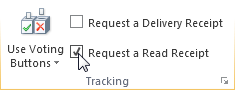
In a new email message, on the Options menu, in the Tracking group, select the Request a Delivery Receipt check box or the Request a Read Receipt check box:
Compose your email and Send the message.
Was this article helpful?
That’s Great!
Thank you for your feedback
Sorry! We couldn't be helpful
Thank you for your feedback
Feedback sent
We appreciate your effort and will try to fix the article